
Use case · SiYuan

SiYuan clipping: let AI read a page's structure once, then reuse the rule forever

SiYuan's own clipper already does its job well: one click sends the whole page or your selection into SiYuan with images localized. What Shunshou adds is keeping the recipe — tell the AI "clip LD246's article and comments into SiYuan", and it reads the page structure once and saves the recipe as a rule. Every later page of the same kind reuses it, with no model call and no token cost. Douban books, movies and games, and web highlights, all follow the same path.

No account · No server · content goes only to the SiYuan kernel you enter

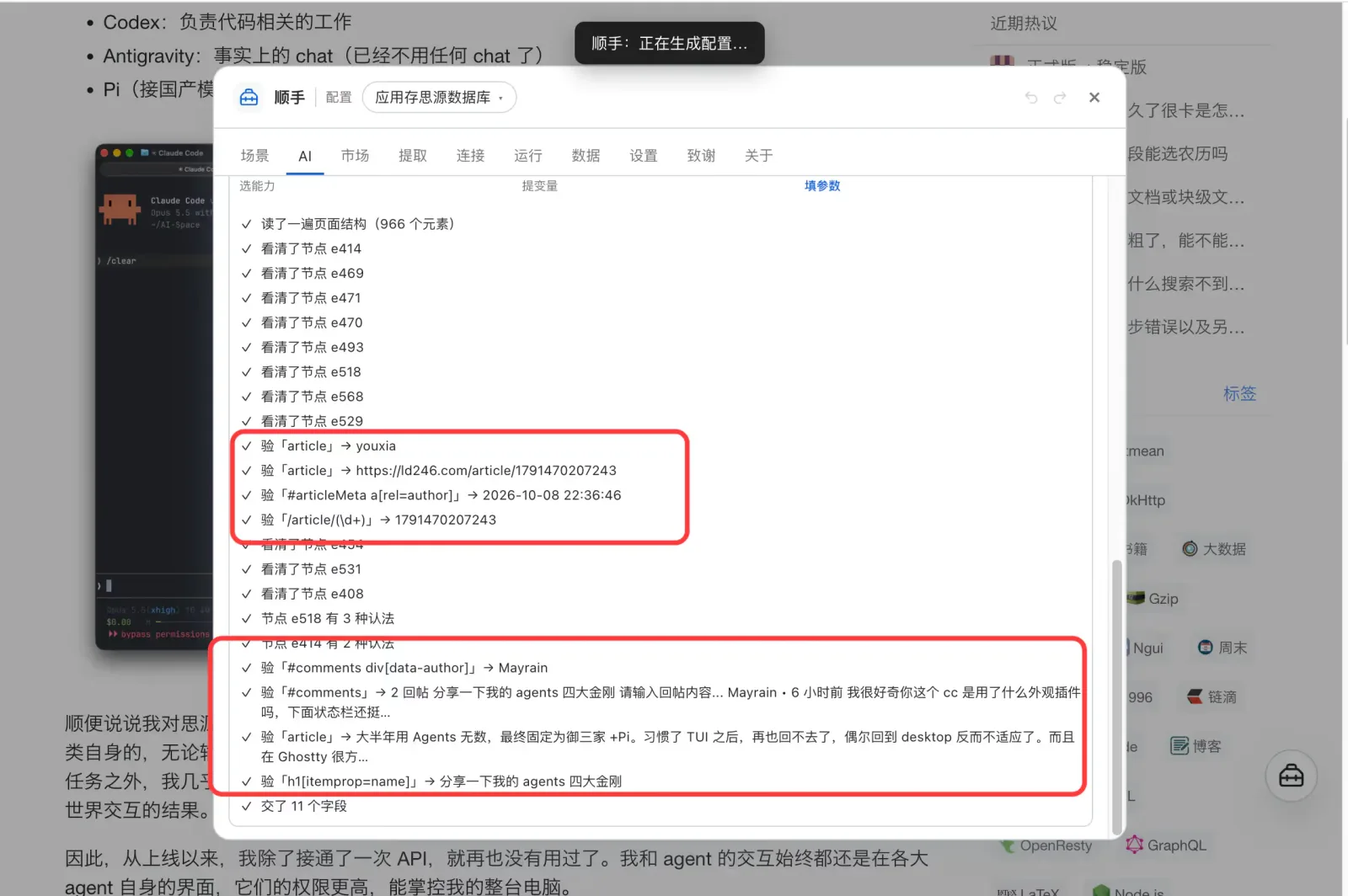
The AI reading this page's structure: every node it inspected and every field it verified
Shunshou's AI page listing each step: read the page structure (966 elements), inspected node e414, verified the article selector, verified the comments selector, and finally handed over 11 fields

The difference

"This clip came out clean" and "the way it was clipped is kept" are two different things

SiYuan's official clipper does one thing very clearly: one click sends the whole page or your selection into SiYuan, localizing images along the way, and it keeps getting better. Shunshou doesn't compete on that — the official one is about getting this page in; Shunshou is about whether the way this kind of page gets clipped can be kept.

The difference is whether the judgement "where is the article, how are the comments shaped" is saved: the official clipper works it out again every time, while Shunshou settles it into an editable, exportable, reusable rule — so the second time and the hundredth time are free, and you can see which node each field came from and what value it actually resolved to.

Concern The official SiYuan clipper Shunshou
Basic clipping One-click full page / selection into SiYuan, images localized, shortcut Ctrl/⌘+Shift+S The same, plus selection excerpts, all-highlights-in-one-go, and batch staging
When the article is wrong Follows the extension's own article detection Pick the container on the page and save it as a rule; or let AI read the structure and offer candidates you can preview for free
Is the recipe kept? Re-detected each time; the recipe isn't stored Saved as a rule: editable, exportable, reusable — and it shows which node each field came from and what value it resolved to
What AI is for — AI generates the rule, not the content: read the structure once → save the rule → every later clip extracts locally with no model call
Comments and threads A full-page clip brings avatars and like buttons along A list primitive: mark each comment's container, take author / time / body per item, so clutter never enters the output
Metadata → database Supports clipping to a database (as a row) Also supported, and field by field: name / rating / developer / link each come from their own node, with missing columns created and primary-key dedupe before writing
Web highlights — Highlight a selection, it stays on the page across reloads, and all highlights can be saved to SiYuan at once
Douban books / movies / games Full-page clip (metadata ends up inside the text) Field by field (17 / 20 / 11 fields) straight into database columns, with covers localized so they don't break
Multiple destinations SiYuan (notebook / database) SiYuan's four targets, plus Orca, Obsidian and local Markdown from the same config — and an action chain can write to several at once
Auto-run — Run automatically on matching pages (off by default, enabled per action, with an optional confirmation)
Together

You can run both at once. Both write into the same workspace through the SiYuan kernel's HTTP API, so they don't interfere. Their shortcuts don't collide either: the official one uses Ctrl/⌘+Shift+C (copy selection) and Ctrl/⌘+Shift+S (clip page), while Shunshou defaults to Ctrl/⌘+Shift+K (command palette).

Example 1 · Article + comments

Clipping an LD246 thread — article and comments — into SiYuan

The hard part on pages like this isn't the article, it's the comments: avatars, like counts and "1 reply" all mixed in with the text. One sentence says what you want; AI works out the structure.

STEP 01

One sentence describing the outcome you want

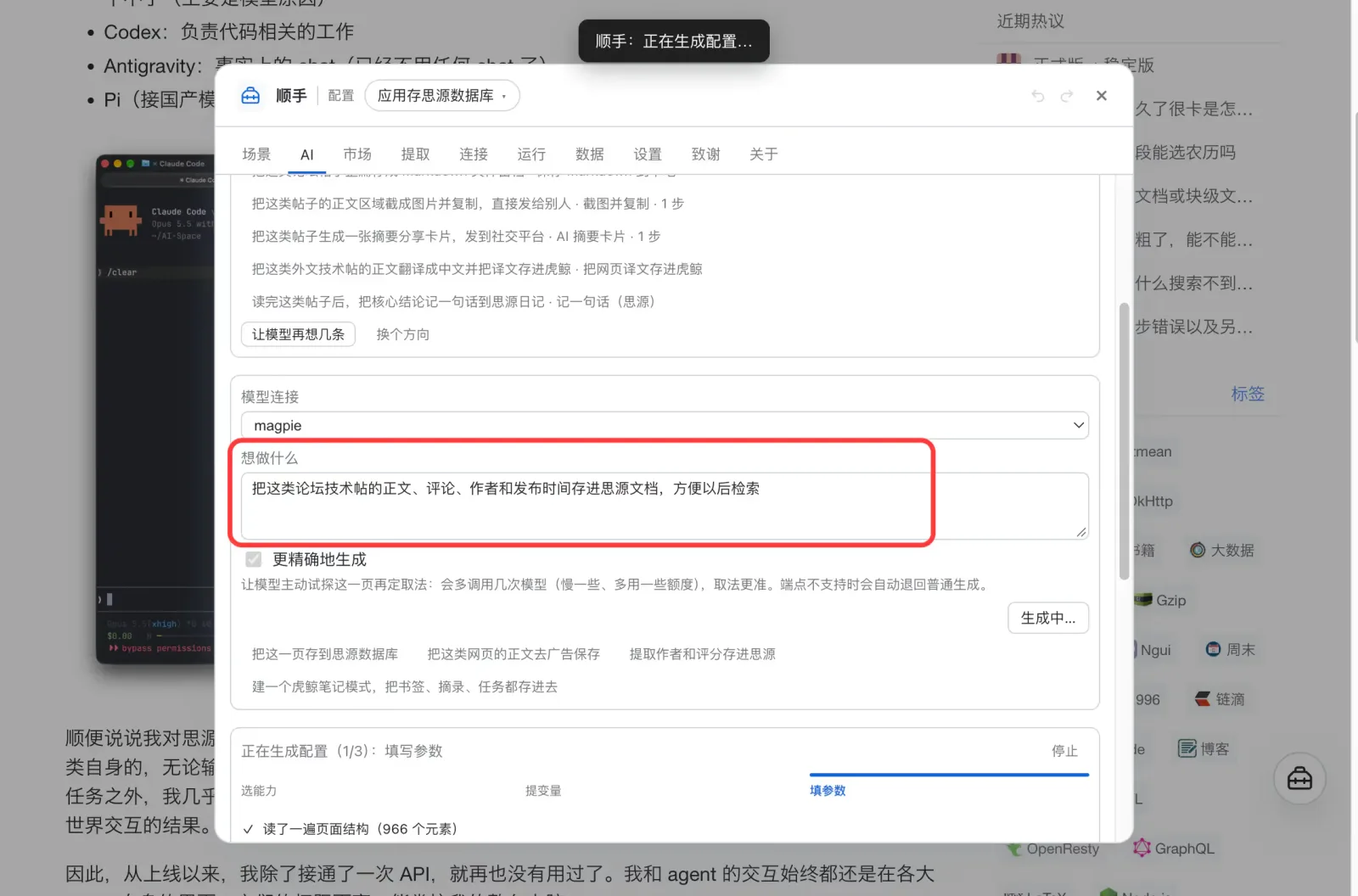
Type plain language into the intent box on the Studio's AI page — no selectors, and no need to know what the page looks like inside:

"Clip LD246's article and comments into SiYuan."

It also picks up the implicit requirements, like "comments should be their own blocks with author and time", because it can see which elements exist and what each one says.

One sentence → a generated config
The Studio's AI page: an intent box containing a one-sentence request, with a generated config preview below it
STEP 02

AI reads the page and verifies every field before writing the config

It first reads this page (how many elements, what the structure looks like), then verifies field by field: what each one actually resolves to. Only what passes gets written into the config.

So you don't get "looks right in the preview, empty when it runs". And the process is visible — every line says which node it inspected or which field it verified and what value came back.

This is the key part: what comes out of that run isn't a piece of content, it's a rule. The rule is saved into your config, and every later clip extracts locally by rule — no model call, no tokens.

Read structure → verify fields → hand over the config
The AI structure-reading log: read the page structure (966 elements), inspected several nodes, verified the article and comments selectors against real values, and finally handed over 11 fields
STEP 03

From then on, one click — and the comments are clean

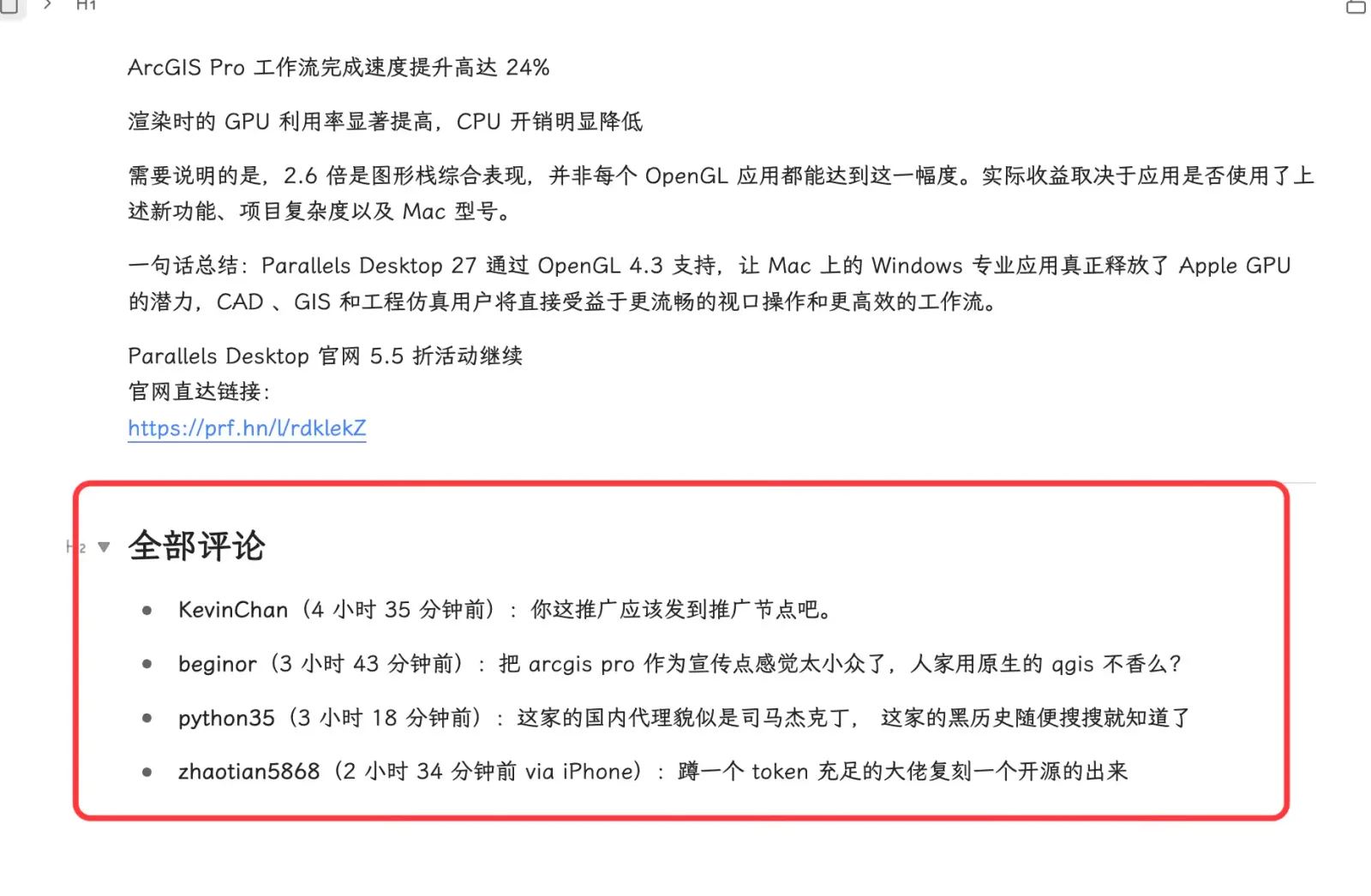
Once the rule is live, a page of the same kind is one click. Below is a V2EX thread clipped: the article on top, comments as their own blocks with author and time, and no avatars or buttons dragged along.

V2EX thread: article + comments, clipped clean
The clipped result in SiYuan: several paragraphs of article, then an All comments section where each comment is a clean list item with username, time and text — no avatars or buttons
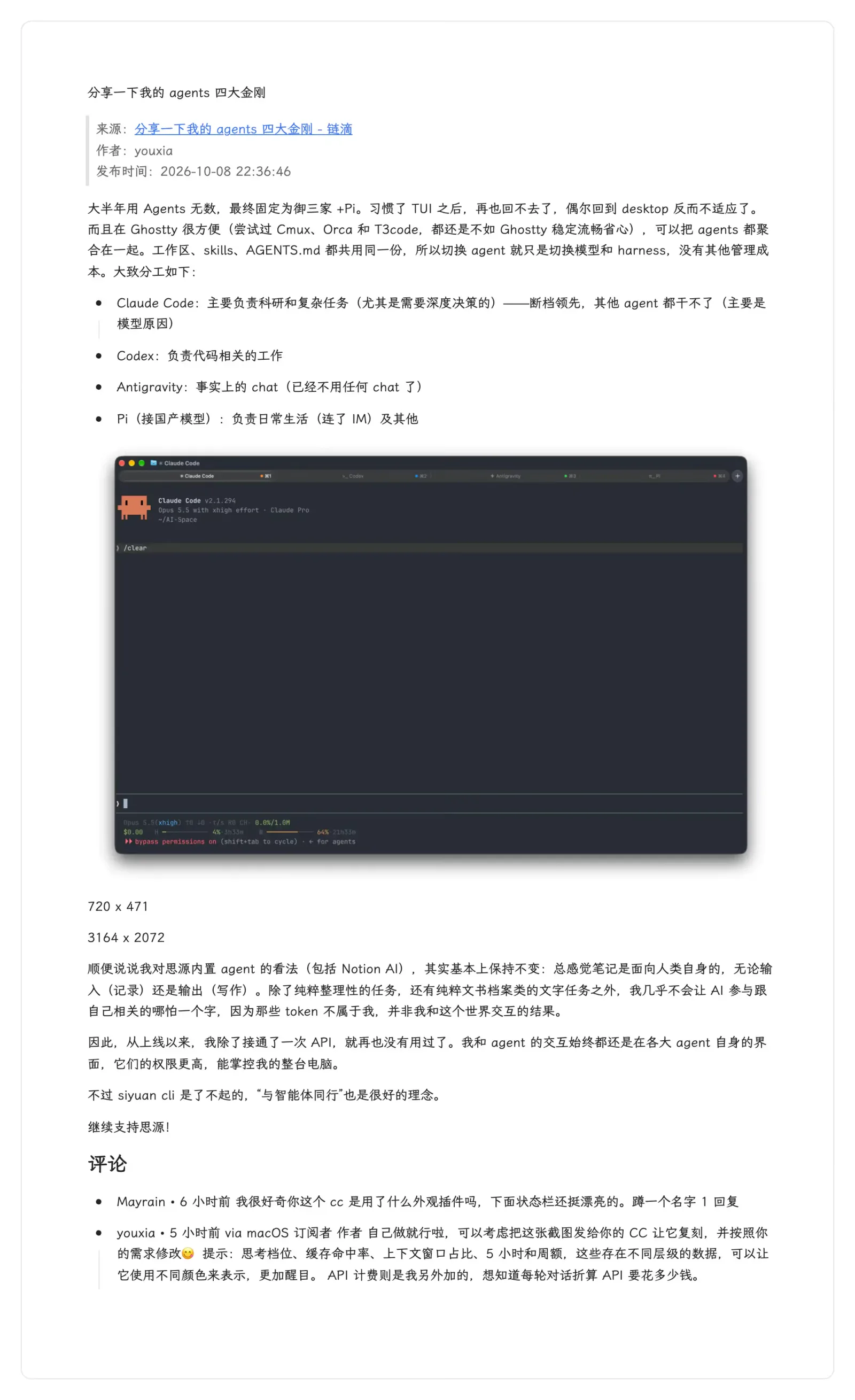
An LD246 thread clipped into SiYuan
The clipped LD246 thread in SiYuan: title, source link, author and publish time, then the article body with a code block, then a comments section

Example 2 · Metadata → database

Collecting App Store apps into a SiYuan database

Clipping keeps a copy; a database accumulates a collection. To turn a pile of apps into a table with name, rating, developer, link and icon, creating the columns and copying the values by hand is miserable — and this is exactly where "let AI learn the rule once" pays off most.

STEP 01

One sentence: save this page into a SiYuan database

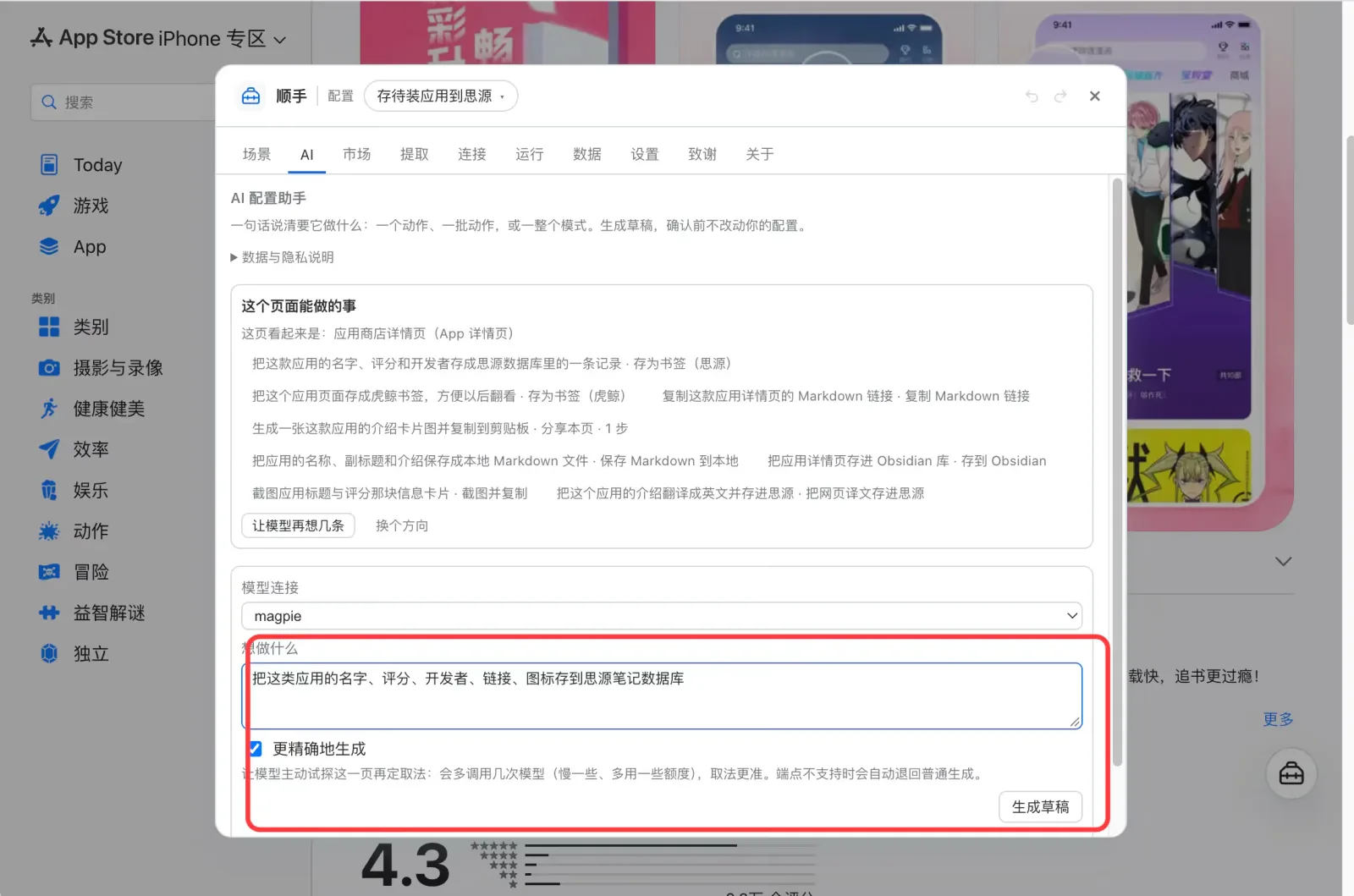
Open the Studio on the App Store page and type a sentence like "save apps I want to install into SiYuan". Because it runs inside the page, it attaches a structural summary of what's on it — so the selectors it generates are verified against this page first.

You don't have to decide up front which fields you want. It can tell what this page offers and proposes the fields it can actually reach: app name, rating, developer, link, icon.

In-page Studio · generate from one sentence
Shunshou's Studio opened inside an App Store page, with a one-sentence intent typed into the box
STEP 02

Several possible values for one field? You pick

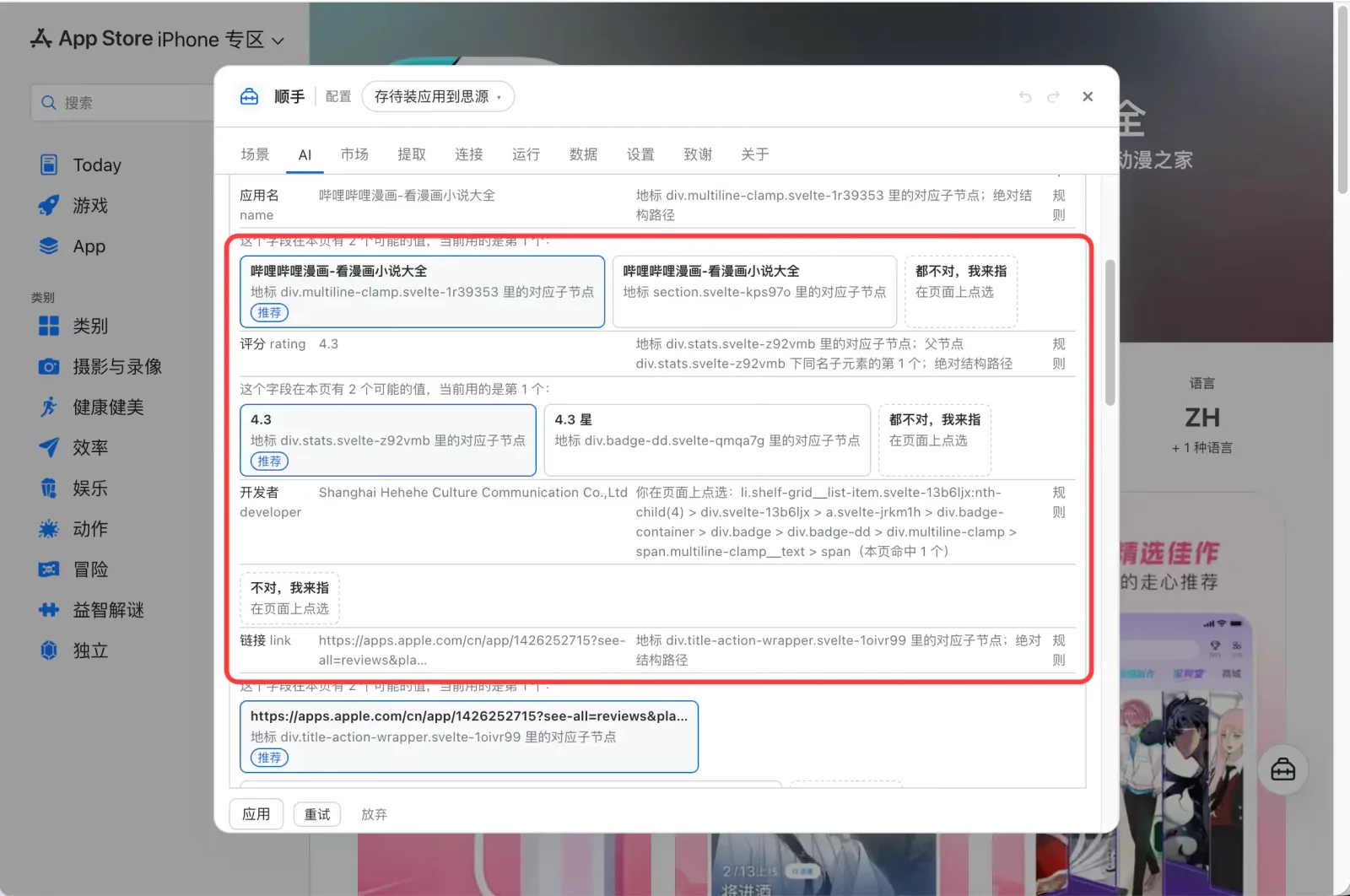
A field often has more than one way to read it (a rating might resolve to 4.3 or to 4.3 stars). All candidates are laid out with the recommended one marked, and you can switch to another with one click.

If none is right, click "none of these, I'll point" and pick the spot on the page — the field is filled in. Fields it can't reach are never hard-coded into the config.

Each candidate also shows how it was found (landmark / parent node / absolute structural path), not just a value to eyeball.

Multiple candidates: switch, or point at it yourself
Generated results where each field offers several candidate value cards marked Recommended with how each was found, plus a none-of-these-I'll-point button
STEP 03

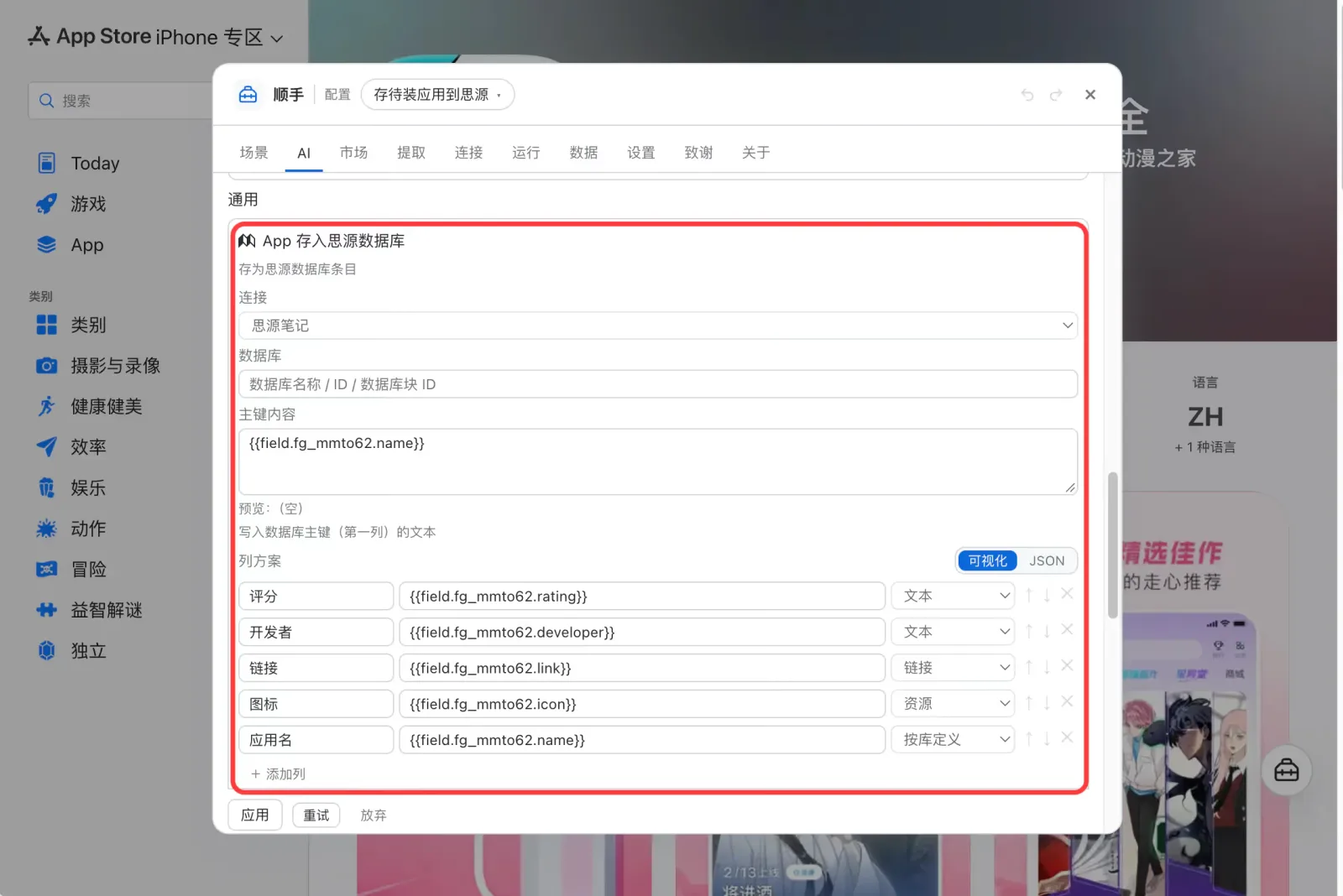
The column scheme is generated, missing columns are created

The generated action already has its columns configured: rating (text), developer (text), link (link), icon (asset), app name (as defined by the database).

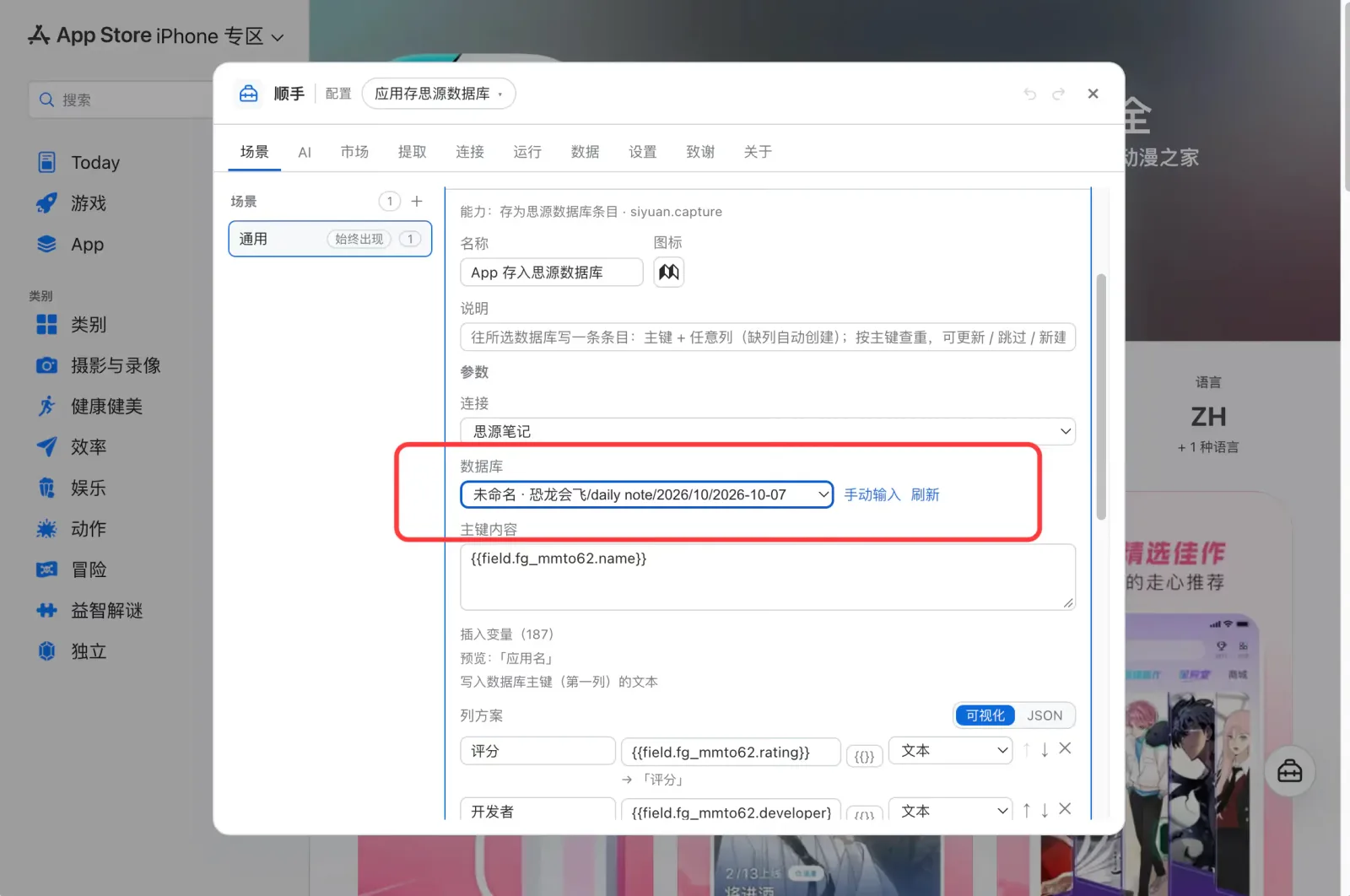
All you do is pick which database to write to — the dropdown lists the databases in your workspace with their paths, so there's no ID to copy by hand. Missing columns are created on write, with the types from the scheme.

Column scheme: field → column, type selectable
The generated action's parameters: a SiYuan connection and a column scheme listing rating, developer, link, icon and app name, each bound to a field and a column type
Pick a database: listed with paths, no ID to copy
The database dropdown listing databases in the workspace with their notebook and path, above the primary key field and column scheme
STEP 04

From then on, one click per app

Once the rule runs, collecting an app becomes "see it → click once". Name, link, developer and rating are filled in automatically, and icons are stored in the SiYuan asset library so they don't break.

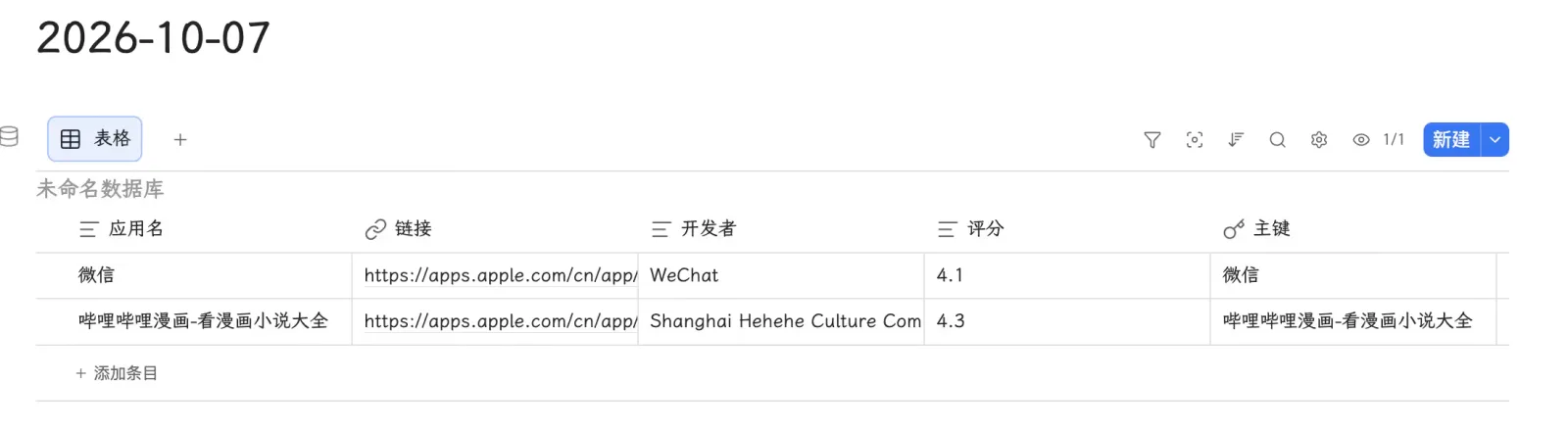
A SiYuan database: name / link / developer / rating
A SiYuan database table whose columns are app name, link, developer, rating and primary key, already holding two rows of app data

The everyday one · Douban

Douban books, movies and games, straight into a SiYuan database

This is structured collecting at its purest: the page already states the title, author, rating and cover, yet turning them into database columns used to mean reading and typing at the same time. Shunshou reads the whole page's fields directly — 17 for a book, 20 for a movie (movies and TV series share the set), 11 for a game.

And no AI is needed here: Douban is a built-in system variable group, ready out of the box. Want different fields? Click "override" and edit — by default it applies to Douban only, and other sites fall back to the system version.

📖

Books · 17 fields

Title, author, translator, producer, subtitle, original title, publisher, publication year, page count, price, binding, ISBN, rating, rating count, Douban ID, link…

The title becomes the primary key and the rest become columns — missing columns are created, typed by the scheme (publication year = date, pages / rating / rating count = number).

🎬

Movies / TV · 20 fields

Title, year, form, director, cast, genre, country, release date, runtime, episode count, synopsis, rating, rating count, comment, cover, Douban ID, link…

Movies and TV series share one field set, so there's nothing separate to configure; "form" and "episode count" tell you which it is.

🎮

Games · 11 fields

Title, genre, platform, aliases, developer, publisher, release date, comment, cover, Douban ID, link.

▣

Covers that don't break

Douban's images are hotlink-protected, so pasting the link into SiYuan turns into broken images within days. Here they're downloaded and uploaded to the SiYuan asset library by default, so the database shows real thumbnails that survive a machine change or going offline.

Switch to "keep original link" if you'd rather not keep local copies.

⊜

Duplicates are checked first

Dedupe is by primary key content (book or film title), exact match only. On a hit it asks you to update, skip or create — skipping is the default, protecting cells you edited by hand.

↻

Browse and it's filed

Set "Save as book (SiYuan)" on Douban pages to auto-run: open a book page and it's filed, no click at all. Off by default, enabled per action, and it can be set to ask before writing.

Two destinations

The same fields also go to Orca — both "Save as book" and "Save as book (SiYuan)" ship out of the box. Want both libraries populated? Chain them with an action chain: one click, one Orca note and one SiYuan row.

Mark as you read

Web highlights: mark on the page, save to SiYuan in one go

The trouble with excerpts is that tidying up comes after reading, and while reading you rarely want to switch windows. Shunshou leaves the mark on the page instead: select a passage, click Highlight, and it stays there — through reloads and across sessions.

✎

On the page, without changing the page

Highlights are laid over the original text and don't modify the site's own DOM — nothing gets scrambled, and nobody else's site gets broken.

They're stored locally and don't travel with export or sync. On Safari, many highlights on one page can get slow; the cap is 200 per page.

☑

Editable, removable, undoable

Click a highlighted passage again to "copy this one" or "remove this one" — and a removal can be undone, so a stray click doesn't cost you anything.

⇥

Done reading, save them all

After marking your way through a page, one "Save highlights (SiYuan)" writes them all into SiYuan (empty target = today's daily note), one passage per block, cleanly.

You can also copy them as text, or reference {{highlights}} in any template.

◇

Works with excerpts and staging

Three granularities, three jobs: highlight leaves a mark to review later, excerpt sends that one passage to today's note now, and staging collects several to save together. All three land in SiYuan.

Setup

Three steps to connect your SiYuan

No SiYuan plugin to install. Shunshou talks to the kernel's own HTTP API — SiYuan just needs to be running.

Get an API token

Open SiYuan → Settings → About → API token, and copy it.

Add a SiYuan connection

In Shunshou's Connections page, add a SiYuan connection with the kernel address (default http://127.0.0.1:6806) and the token, then hit Test — it tells you which SiYuan version it reached and how many notebooks and databases you have.

Pick a destination for the action

Go back to the action and choose where it lands: a database row, today's daily note, a specific document, or a document database. Configured and live immediately; a mistake is one undo away.

Note

Once the connection is configured, the "save to SiYuan" actions appear where they belong. Before that they sit in the "not configured" section at the bottom of the panel, so they never take up a slot you might click by mistake.

Other scenes

Once it's connected, there's more it can do

These all ship out of the box and are clickable as soon as the connection is set up. Fields, templates and cleaning rules for each are edited visually in the Studio.

Selected highlight → today's daily note

Select a passage and click "Excerpt to daily note" on the capsule; it's appended to that day's note — and the note is created if it doesn't exist.

You can also target a fixed document (created if missing) and choose to insert at the end or the beginning. Read it, keep it, never leave the page.

New document into a database

Create the content as a SiYuan document and bind it into the chosen database — either following the database's own item template or a custom save path such as /Collection/{{dateText}}/{{title}}.

There's also an AI-summary variant that summarizes the page into structured text first.

Save a translated page

A whole foreign article is translated with your browser's built-in on-device translation (desktop Chrome / Edge 138+) — zero configuration, no cost, and the text never leaves your machine.

The translation is shown in a bubble first; only when you click "Save to SiYuan" is anything written.

Collect a few, save them together

Click "Add to staged" on each passage you like, then save the whole batch to SiYuan at once from the staged area at the top of the orb panel. A count badge on the orb reminds you how many are still waiting.

Line breaks, SiYuan semantics

Per action you can decide how line breaks are treated: single breaks as paragraphs, 1 or 2 breaks between paragraphs (SiYuan semantics: 1 = line break inside a block, 2 = new block), or collapse consecutive blank lines.

Image lists inside the text

When a template references {{page.images}} or {{field.*.images}}, add the :md hint and it renders as Markdown images and gets localized into the SiYuan asset library along with the text — no hand-written ![](...).

Combines with

It isn't an isolated "clip button"

The SiYuan destination is one link in the toolbox — it can follow another action, or run on its own.

Both libraries at once (action chains)

An action can carry "then do" steps: save an Orca bookmark, then write a SiYuan database row — one click, both libraries populated. Steps run in order, stop at the first failure, and share one extraction of the page.

See it, log it (auto-run)

Douban book / movie / game pages can be set to auto-run "Save as book (SiYuan)" the moment you open them — browse and it's filed, no click at all. Off by default, enabled per action, and it can ask you first.

Higher-fidelity article

When the destination is SiYuan the article switches to SiYuan's own converter (better fidelity than the built-in one): headings, merged table cells and code blocks all come through. Clipping itself keeps links, emphasis and formulas (as $…$ / $$…$$).

Rules can be shared

A finished article rule can be exported as a rule pack and sent to someone else; a whole scene exports as .action-pack.json. They get the same recipe without having to have AI work it out again.

Point at it yourself when it's wrong

Bad article? Pick the container on the page (multi-select merges, Enter finishes), then "Save as rule" to promote it to a lasting rule — no AI required at any point if you'd rather do it by hand.

Do it all without AI

Nothing here requires a model connection. Douban and the other built-in rules work out of the box, and picking containers yourself works offline — AI is only the shortcut for pages you don't want to point at.

FAQ

Questions about Shunshou + SiYuan

SiYuan already has an official clipper. Why use Shunshou?

The official extension is good at "clipping this one page well": one-click full page or selection, images localized, and it keeps improving.

What Shunshou adds is "turning the recipe into a rule": AI reads the page structure once and saves where the article is, how comments are shaped and which node each field comes from as a reusable rule. Every later page of the same kind is one click with no model call and no token cost. Comment threads and structured "metadata → database" collecting are where it earns its keep.

Does it conflict with the official SiYuan clipper?

No, you can run both. Both write into the same workspace through the SiYuan kernel's HTTP API, so they don't interfere.

Their shortcuts differ too: the official one uses Ctrl/⌘+Shift+C (copy selection) and Ctrl/⌘+Shift+S (clip page), while Shunshou defaults to Ctrl/⌘+Shift+K (command palette).

Does generating rules with AI cost money on every clip?

No. AI runs only once, during the "read the page structure" step, and what it produces is a rule (selectors and field recipes), not content. Once the rule is saved to your config, every later clip extracts locally by rule — no model call, no tokens, and it works offline.

You can skip AI entirely, too: pick the container yourself on the page and "Save as rule". Same result, just a few more clicks from you.

Can Douban books, movies and games go straight into a SiYuan database?

Yes. A book page yields 17 fields, a movie page 20 (movies and TV series share the same set) and a game page 11. One click writes them into the database you pick, with missing columns created automatically and types from the scheme.

Cover images are downloaded and then uploaded to the SiYuan asset library, so thumbnails show up in the database and keep working on another machine or offline. Rows are deduped by primary key before writing — skipping by default, which protects cells you edited by hand.

What are web highlights, and can they be saved to SiYuan?

Select a passage and click Highlight; the mark stays on the page, surviving a reload and without changing the page's own structure. Clicking a highlight again lets you copy or remove it, and a removal can be undone.

When you're done reading, every highlight on the page can be saved to SiYuan in one go (empty target = today's daily note), or copied as text. Highlights are stored locally and don't travel with export or sync.

Can pages like comment threads be clipped cleanly?

Yes. List-shaped structures use "container + per-item subfields + per-item template": mark the container for each comment, then take author, time and body per item, so avatars and like buttons never enter the output.

Article-plus-comments on communities like LD246 and V2EX clips into clean Markdown in one go, with a separator between items and an item cap (it tells you "N more not taken" when it hits it).

Do I need to install a SiYuan plugin?

No. Shunshou talks to SiYuan's own kernel HTTP API. As long as SiYuan is running, enter the kernel address (default http://127.0.0.1:6806) and an API token — no marketplace plugin required.

Will the same page get saved twice?

Not by default. Before writing a database row it dedupes by primary key content and asks you to update, skip or create — skipping is the default, which protects cells you edited by hand. You can also set it to always skip or always create.

Document databases work the same way: on a name collision it asks whether to skip or create anyway.

Does my content go through any third-party server?

No. Content goes only to the SiYuan kernel address you entered — usually your own machine or LAN. Shunshou has no account system and no server; the author receives none of your data.

When AI reads a page structure, what leaves is only a structural summary of the page (elements and text), going to the model endpoint you configured yourself. And with "Save a translated page", the translation is done by your browser's built-in translation on your own machine, so that text doesn't leave it either.

Install

Pick one and you're set

The store versions update themselves; the userscript suits phones or anyone who'd rather not install an extension.

Userscript (works on mobile)

Install a script manager first (Tampermonkey / Violentmonkey; Firefox on Android, Safari + Userscripts on iOS), then the script.

Install shunshou.user.js →

Manual

To load the zip yourself (or if the stores aren't an option): download shunshou-extension-*.zip from Releases, unzip it, then open chrome://extensions, turn on Developer mode and choose "Load unpacked". The full walkthrough is on the home page's install section.

Shunshou

Make this kind of page a one-click job, forever

Enter the kernel address and an API token; leave the rest to it.

Or download the zip, or see every install option.